
9. People, roles and tokens
This chapter explains who can sign in to kudurru, what each person can do, and how to make API tokens. It also shows the audit log.
Before you start: You have the role Admin. The role Viewer is enough to read your own account and to make your own tokens.
How access works
Access has two parts.
- Authentication finds out who a person is. A person signs in with a password or with single sign-on. A program uses a token.
- Authorization finds out what the person can do. kudurru gives each person one or more roles.
A person with no role has no access. kudurru refuses a single sign-on login if no role binding matches the person. It never gives the role Admin by default.
Roles
| Role | Purpose | Can do |
|---|---|---|
| Viewer | Look at the setup and the statistics | Read zones, records, lists, policies, groups, clients, settings and statistics |
| Auditor | Check what happens | Everything that a viewer can do. Also read the query log, the access requests and the audit log, and export them. |
| Operator | Run the daily work | Everything that an auditor can do, except reading the audit log. Also change records, lists, policies, groups and clients. Switch blocking on and off. Flush the cache. Answer access requests. |
| Zone admin | Run one or more zones | Read statistics. Manage the zones and the records in its scope, including transfers. |
| Admin | Run everything | All functions, including settings, upstreams, nodes and purge of the query log |
A role has a scope. The scope is the whole cluster. The role Zone admin can also have the scope of one zone. Then it works for that zone only.
Each page of the dashboard shows only what the role can use. A button that the role cannot use is gray. A page that the role cannot read shows the message Not permitted with the name of the missing permission.
See your own roles
- Open System > Access & audit.
- Read the section Signed in as. It shows your user name, your groups and your roles.
- Click Permissions to see each permission that you have.
Figure 1 shows the page.
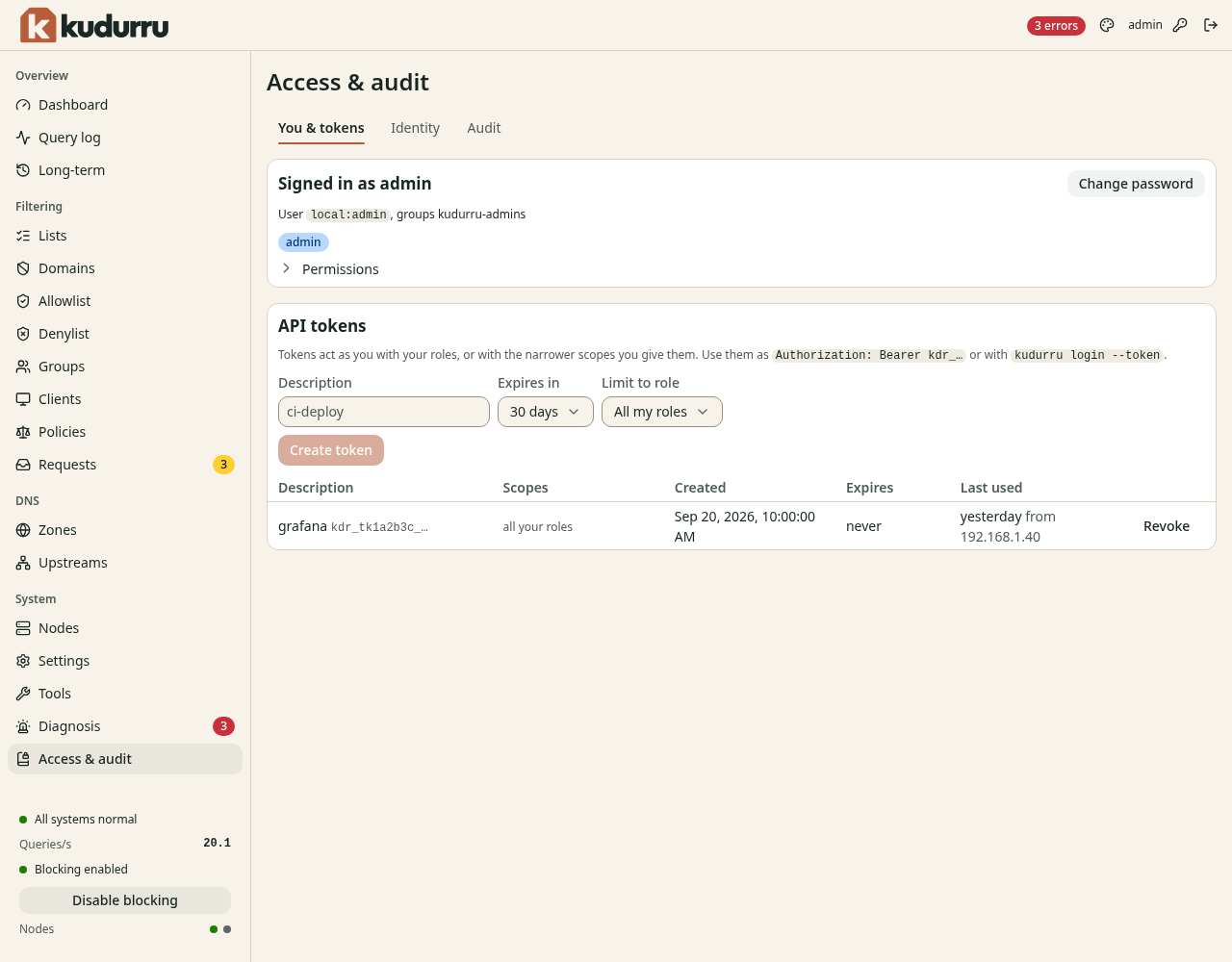
Figure 1. The page Access & audit.
Give a role to a person
In version 0.1, the dashboard shows users, role bindings and identity providers but does not change them. You set them in files or in Kubernetes objects. The page shows the label Read-only in this release.
A role binding gives a role to users, groups or service accounts. Add
bindings in kudurru.yaml:
rbac:
  bindings:
    - role: operator
      subjects:
        - {kind: Group, name: "dex:network-team"}
    - role: zone-admin
      scope: {kind: zone, name: home-arpa}
      subjects:
        - {kind: User, name: "dex:alice@example.com"}
The first binding gives the role Operator to the group network-team of the
identity provider dex. The second gives the role Zone admin for the zone
home-arpa to one user. The name of a user or group starts with the
identifier of the identity provider and a colon.
In Kubernetes, use RoleBinding objects. They add to the bindings in the
file.
NOTE: A change to rbac.bindings needs a restart of the node.
Single sign-on
kudurru can use an OpenID Connect provider. Examples are Google, Microsoft
Entra ID, Keycloak, Authentik and Dex. Each provider has an entry in
auth.identityProviders in kudurru.yaml. An entry needs an id, an
issuer, a clientID, a clientSecretFile and a redirectURL. The
settings reference
lists all the fields.
After you set up a provider, the sign-in page shows one button for it.
Local accounts
The account admin is a local account. kudurru makes it at the first
start. You set up other local accounts in files. The dashboard shows
the local users on the tab Identity.
To turn off the local sign-in when all your people use single sign-on, set
auth.localLogin to disabled. The value admins-only allows the built-in
admin only. You cannot lock yourself out: the command kudurru admin on
the host always works.
Limits at sign-in
kudurru protects the sign-in against attacks that try many passwords.
- After 5 failed sign-ins from one address, kudurru refuses sign-in from that address for 5 minutes.
- After 10 failed sign-ins for one user name, kudurru refuses sign-in for that user for 15 minutes.
A sign-in session ends after 30 minutes without activity, and after 12
hours at the most. You can change these times with
auth.session.idleTimeout and auth.session.lifetime.
See the identity data
Click the tab Identity on the page Access & audit. Figure 2 shows it.
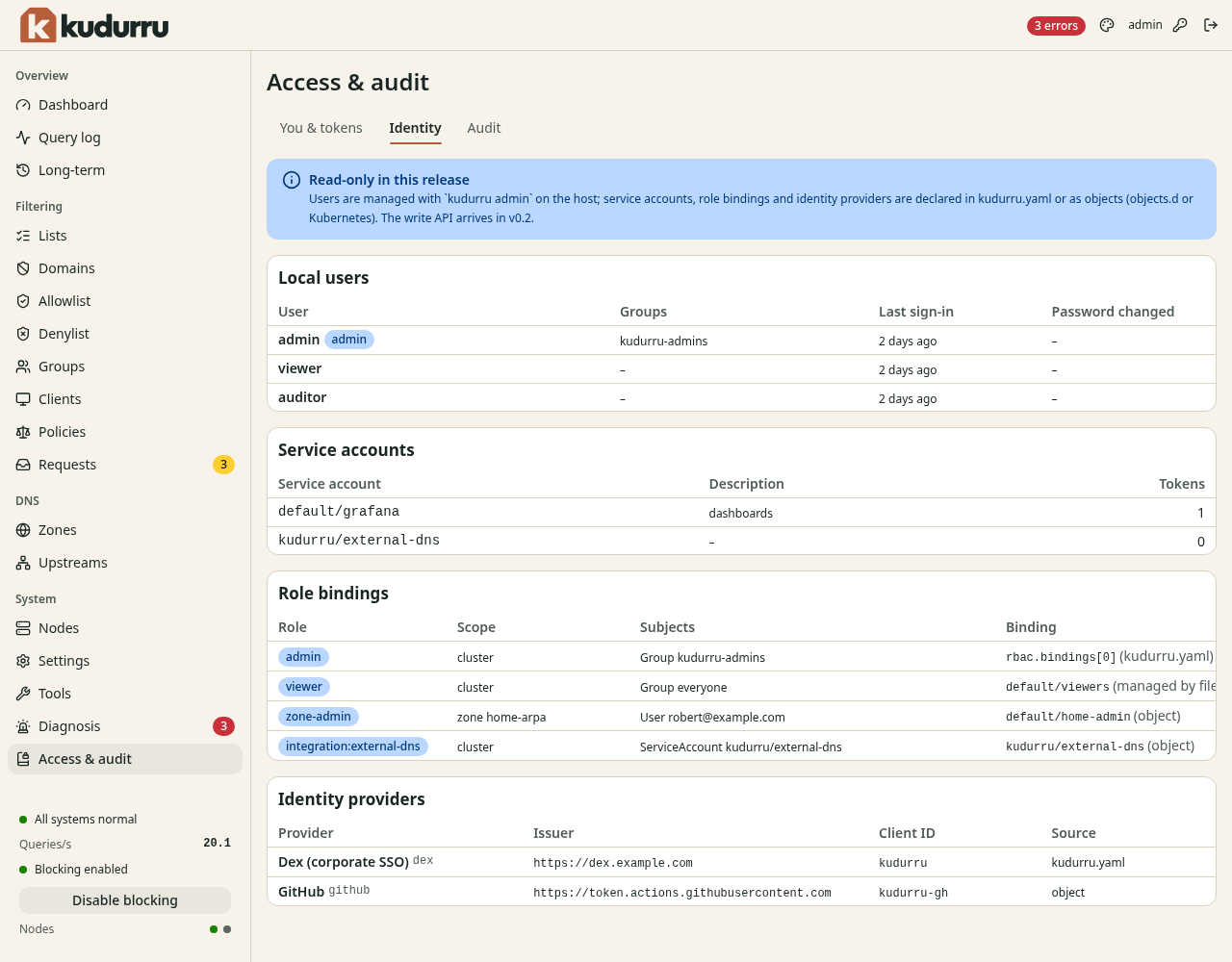
Figure 2. The tab Identity.
The tab has four tables.
| Table | Content |
|---|---|
| Local users | The local accounts, their groups and the time of the last sign-in |
| Service accounts | Accounts for programs, with the number of tokens |
| Role bindings | The role, the scope, the subjects, and where the binding comes from |
| Identity providers | The single sign-on providers |
Change your password
- Click the key icon at the top right of the page. Or click Change password on the tab You & tokens.
- Enter the Current password.
- Enter a New password of 8 characters or more. Enter it again in Confirm password.
- Click Change password.
kudurru signs out all the other sessions of the account.
API tokens
A token lets a program use the API without a password. The program has the roles of the person who made the token, or fewer.
Make a token
- Open System > Access & audit. The tab You & tokens shows.
- In Description, enter what the token is for, for example
home-assistant. - In Expires in, select a time. The default is 30 days.
- If the token needs fewer permissions, select a role in Limit to role. If you select Zone admin, also select the scope One zone and the Zone.
- Click Create token.
The page shows the token one time (Figure 3). Copy it at once.
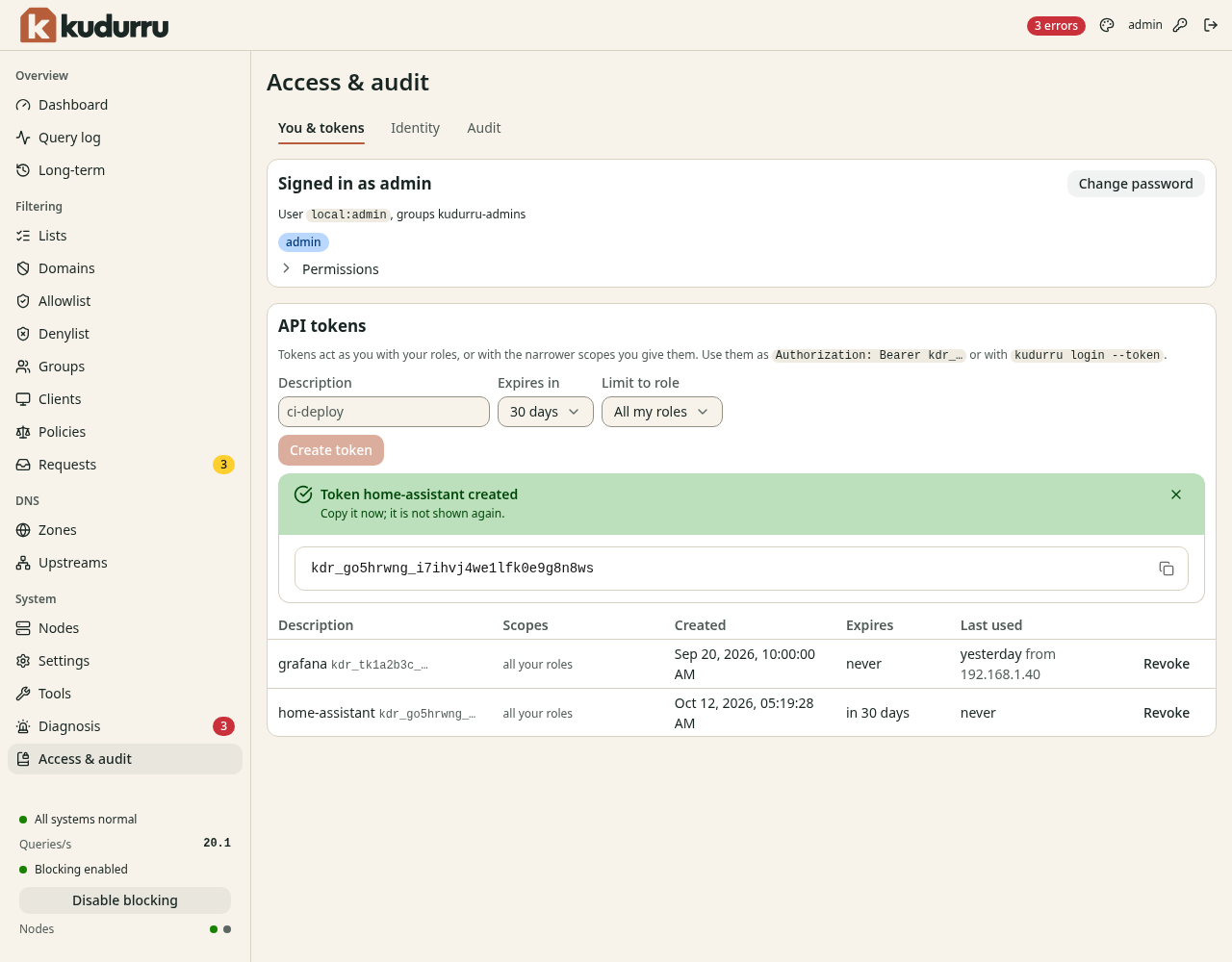
Figure 3. A new token.
CAUTION: kudurru does not show the token again. If you lose it, revoke it and make a new token.
A token starts with kdr_. Use it in one of these ways:
- Send it in the header
Authorization: Bearer kdr_…of an API request. - Use it for the command line:
kudurru login --server <url> --token kdr_….
The administrator can set the longest life of a token with
auth.tokens.maxLifetime. The default of 0 allows tokens that never
expire.
Revoke a token
- Open the tab You & tokens.
- Click Revoke in the row of the token.
The program that uses the token gets an error from then on.
NOTE: Use one token for each program. Then you can revoke one token without a change for the others. Select the shortest time that is practical.
Tokens on the host
If you cannot sign in, you can make a token on the host. See Recover a lost admin password.
Read the audit log
kudurru writes an entry to the audit log for each change that comes through the API. The role Auditor or Admin can read it.
- Open System > Access & audit.
- Click the tab Audit. Figure 4 shows it.
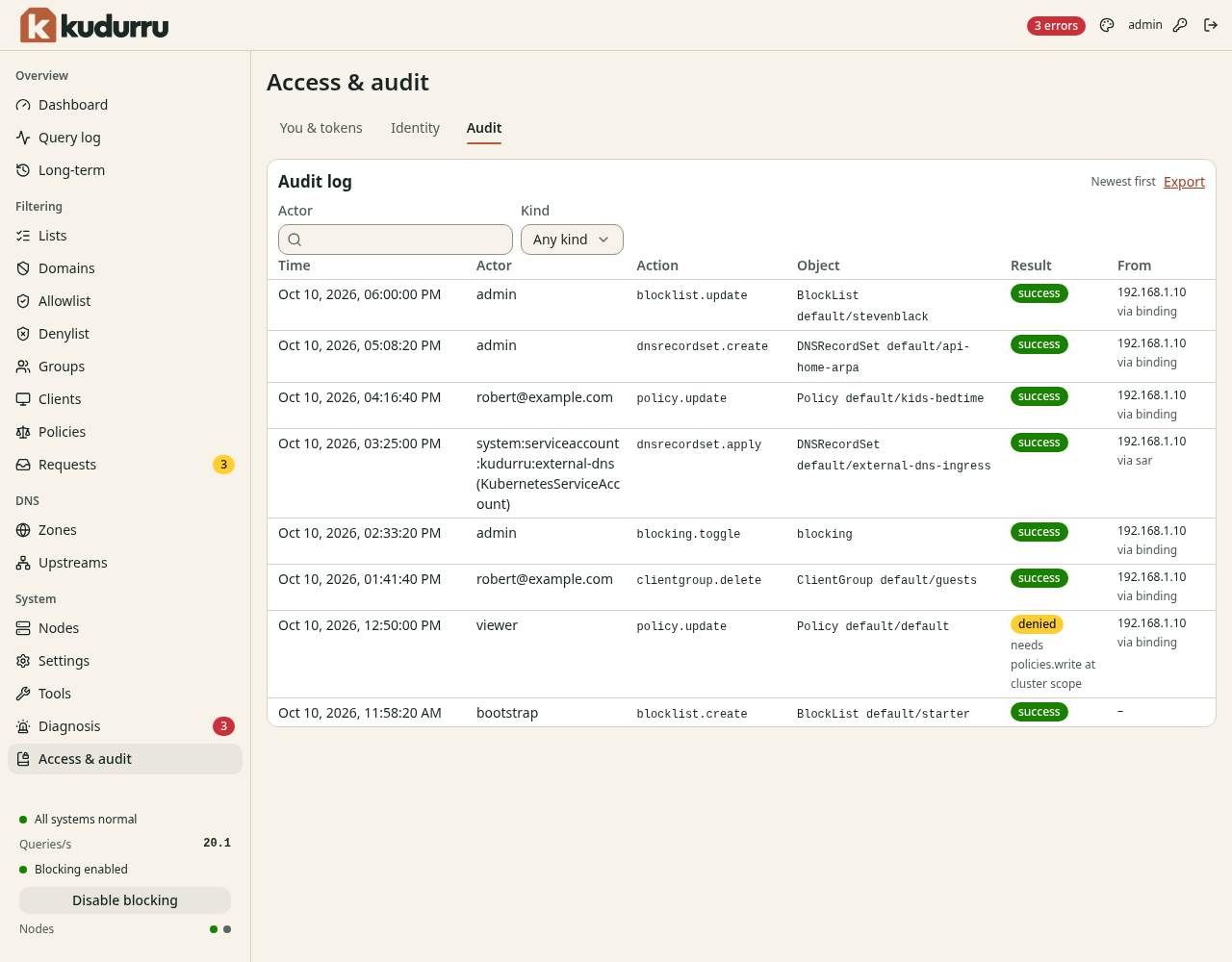
Figure 4. The tab Audit.
| Column | Meaning |
|---|---|
| Time | The time of the action |
| Actor | The person or the program |
| Action | What happened, for example policy.update |
| Object | The kind and the name of the object |
| Result | success or denied. A denied entry shows the permission that was missing. |
| From | The address that the request came from, and how kudurru authorized it |
Use the filters Actor and Kind to limit the rows. Click Load older events to see more. Click Export to download the log as a file of JSON lines.
You can also read the log on the command line:
kudurru audit --since 24h --actor admin