
Manage your account and API tokens
Before you start
- Sign in with the account that the program needs to act as.
- You need permission to create your own tokens.
Check your account
- Open System > Access.
- Select You & tokens.
- Read Signed in as and your assigned roles.
- Click Permissions to inspect allowed actions.
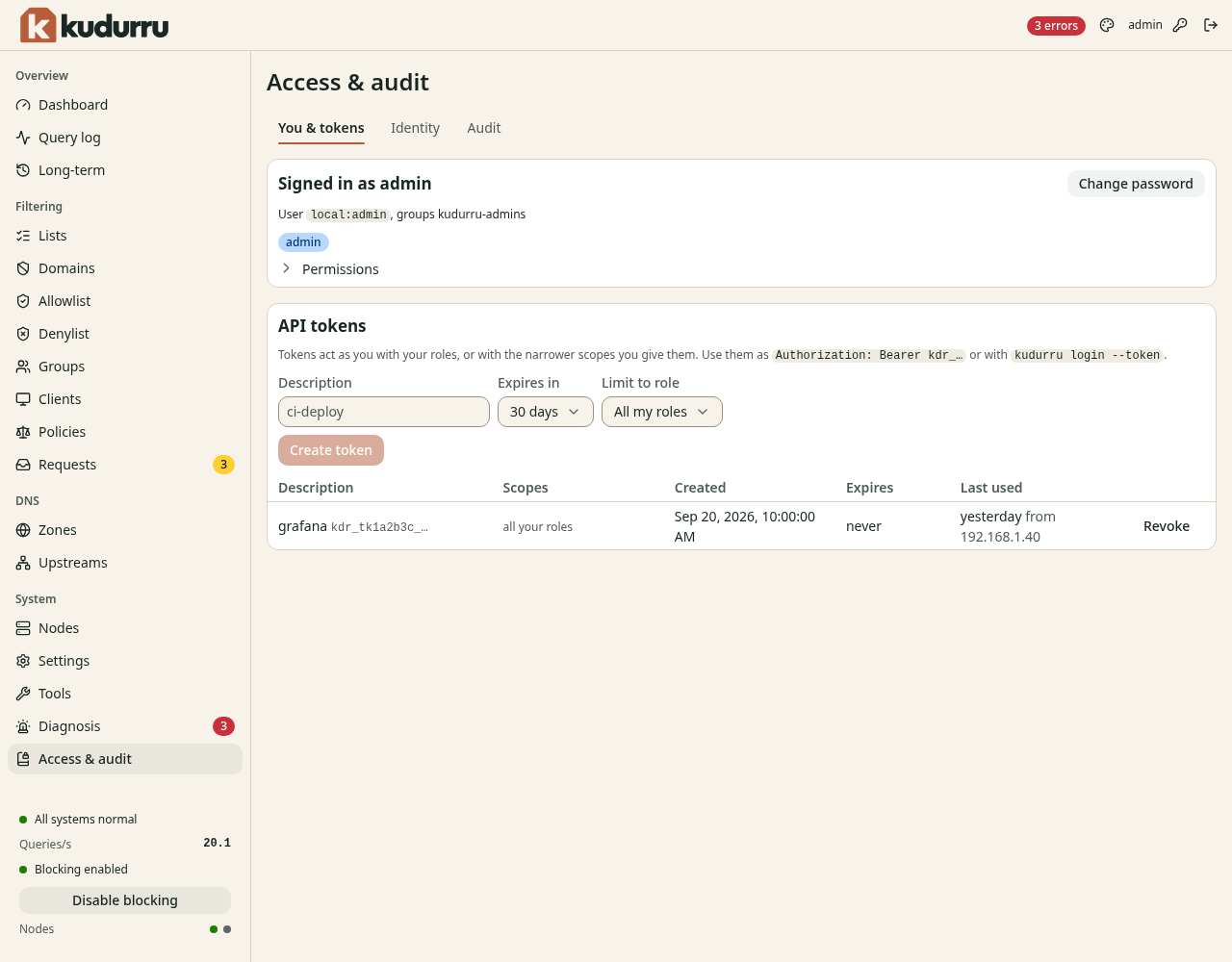
Figure 1. Tokens use your roles or a narrower scope that you select.
For a local account, use Change password. Enter the current password, the new password and its confirmation, then save. Changing a password signs out the account's other sessions.
Create a token for one program
- Enter the program's purpose in Description.
- Select the shortest practical period in Expires in.
- Select a role in Limit to role if the program needs fewer permissions.
- Select One zone and the Zone for a zone-scoped role.
- Click Create token.
- Copy the token into the program's secret configuration.
CAUTION: The token appears only once. Treat it as a password. If you lose it, revoke it and create another token.
Programs send Authorization: Bearer <token> to the API.
Use one token per program so you can revoke access independently.
Click Revoke in its row when the program no longer needs access.
Use Identity to inspect users, role bindings and sign-in providers.
Check the result
The program can perform its intended operation with the token. Confirm its scope with a permitted read request before enabling automated changes. After revocation, requests with that token fail authentication.