
Change a dashboard setting
Before you start
- You need the
adminrole to save node or cluster settings. - Record the current value so you can restore it.
- You need host access for a setting labeled
host onlyorrestart.
Find and save a setting
- Open System > Settings.
- Select Expert.
- Enter part of the key in Search all settings.
- Read the description, limits and labels.
- Change the value.
- Click Save.
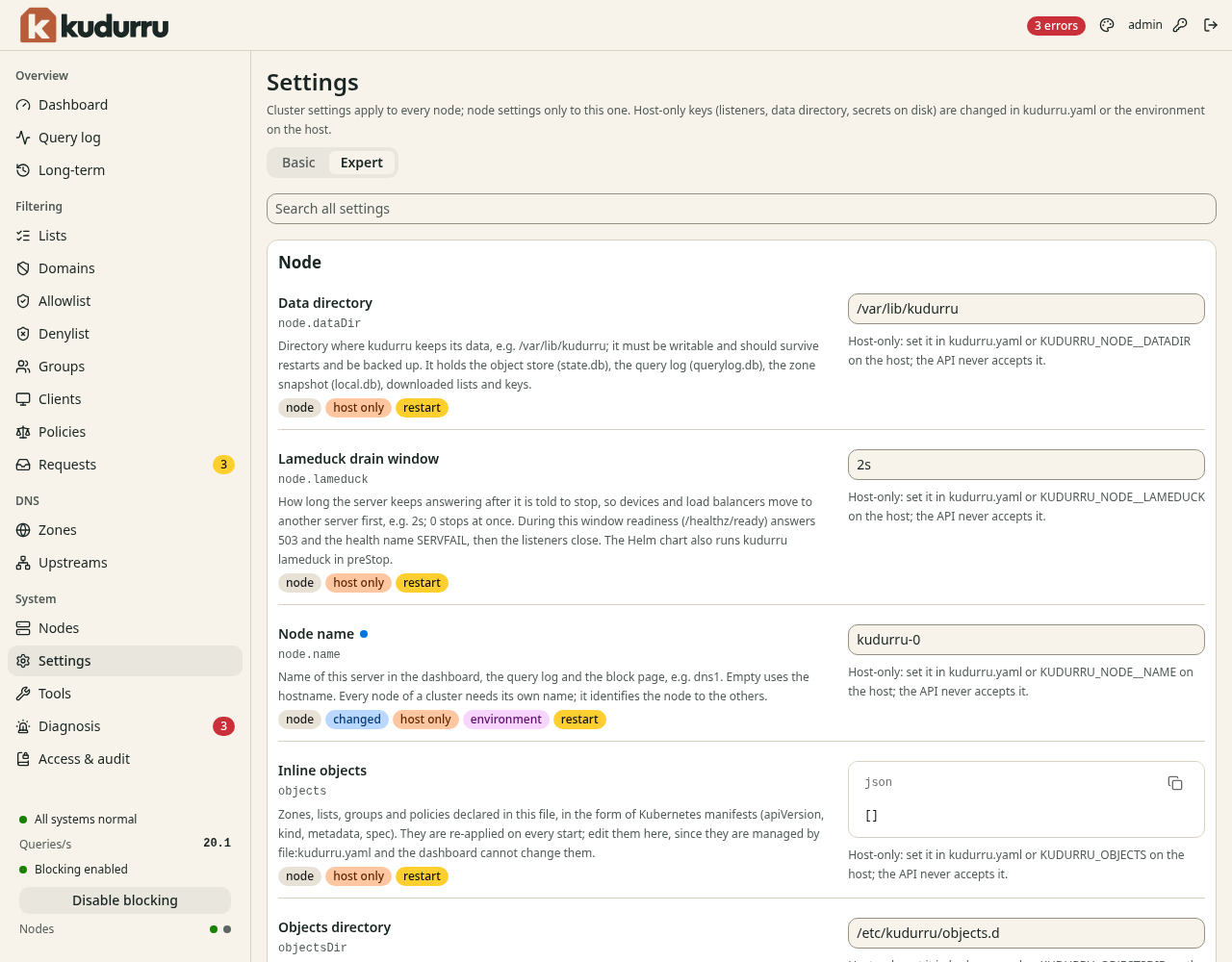
Figure 1. Check scope and ownership before you change a value.
| Label | Meaning |
|---|---|
cluster | Applies to every node |
node | Applies to this node |
host only | Edit the host configuration or deployment values |
environment | An environment variable controls the value |
restart | The node needs a restart to apply the value |
Basic groups common settings by topic. Reset to default restores a field's default value; save the change to apply it. Use Edit as JSON for a structured value when needed.
CAUTION: Kept in memory only means the node has no settings file.
Set KUDURRU_SETTINGS_FILE on the host to keep changes across restarts.
Change appearance
Select Auto, Light or Dark under Appearance. Choose a Theme or turn on High contrast as needed. These preferences stay in this browser. The palette button opens the same controls.
Check the result
Reload the page and confirm the saved value. If the page shows Restart required, restart through your deployment workflow and verify again. Use the settings reference for key details.