
Set the DHCP address pool
Before you start
- You need the
adminrole and the open New DHCP scope wizard. - You need to complete the Subnet step.
Set the address pool
- Click Next to open Addresses.
- Enter the pool boundaries in First address and Last address.
- Enter the gateway address in Router.
- Click Add DNS server.
- Enter the kudurru address in DNS servers 1.
- Keep Lease duration at
12hfor this example.
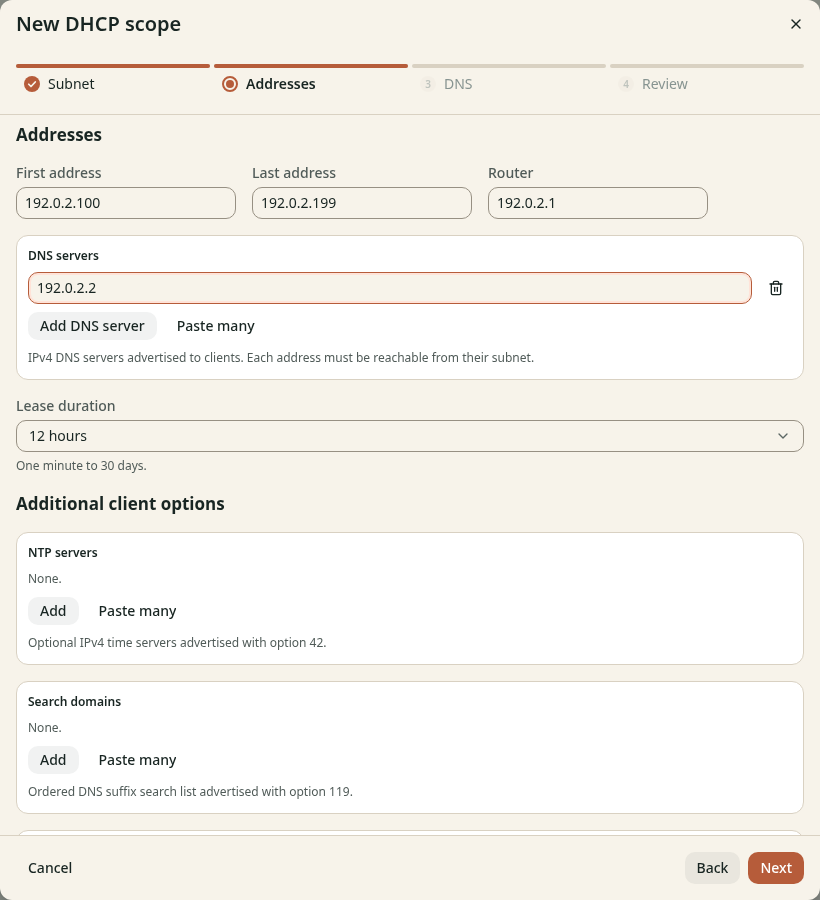
Figure 1. These options go to clients when they acquire or renew a lease.
Keep the additional network and boot options at their defaults unless your network needs them.
Check the result
The first and last addresses fit the subnet. The pool excludes static addresses and addresses that the old server still leases to other clients. The DNS server is your kudurru node. Keep the wizard open and continue to Set lease DNS.